QORO - Intercity Depot Management System
SAAS, Dashboboard, Fleet Management
This project reimagines public bus depot operations through a real-time browser-based SaaS application. It enables depot managers to monitor fleet health, assign crew efficiently, schedule maintenance, track routes and access financial data all in one system. Built with scalability in mind, the system ensures better uptime, reduced operational friction and actionable insights for smoother transit operations across India.
Timeline:
4 Weeks Project
Team:
Utkarsh Kulkarni, Shivani Kavitkar
My Role:
Research, Design, Prototyping
User:
Fleet Managers
Tools:
Figma, FigJam, Photoshop, Illustrator, GPTs
Project Overview
Senthil manages over 80 buses and 200 crew members out of MTC's Adyar depot in Chennai. Every morning he walks into a room full of registers, phone calls, and whiteboards and spends the first two hours just figuring out what happened the night before.
Qoro is what we built for him. A desktop SaaS tool that puts his entire depot on one screen - live fleet status, crew assignments, maintenance alerts and daily collections designed for government transport staff who have limited time and even less patience for software that requires training.
Qualitative Research
Our interviews with one of the people responsible for overseeing the running of the bus depot revealed some very insightful information on what was troubling him and what his needs were.
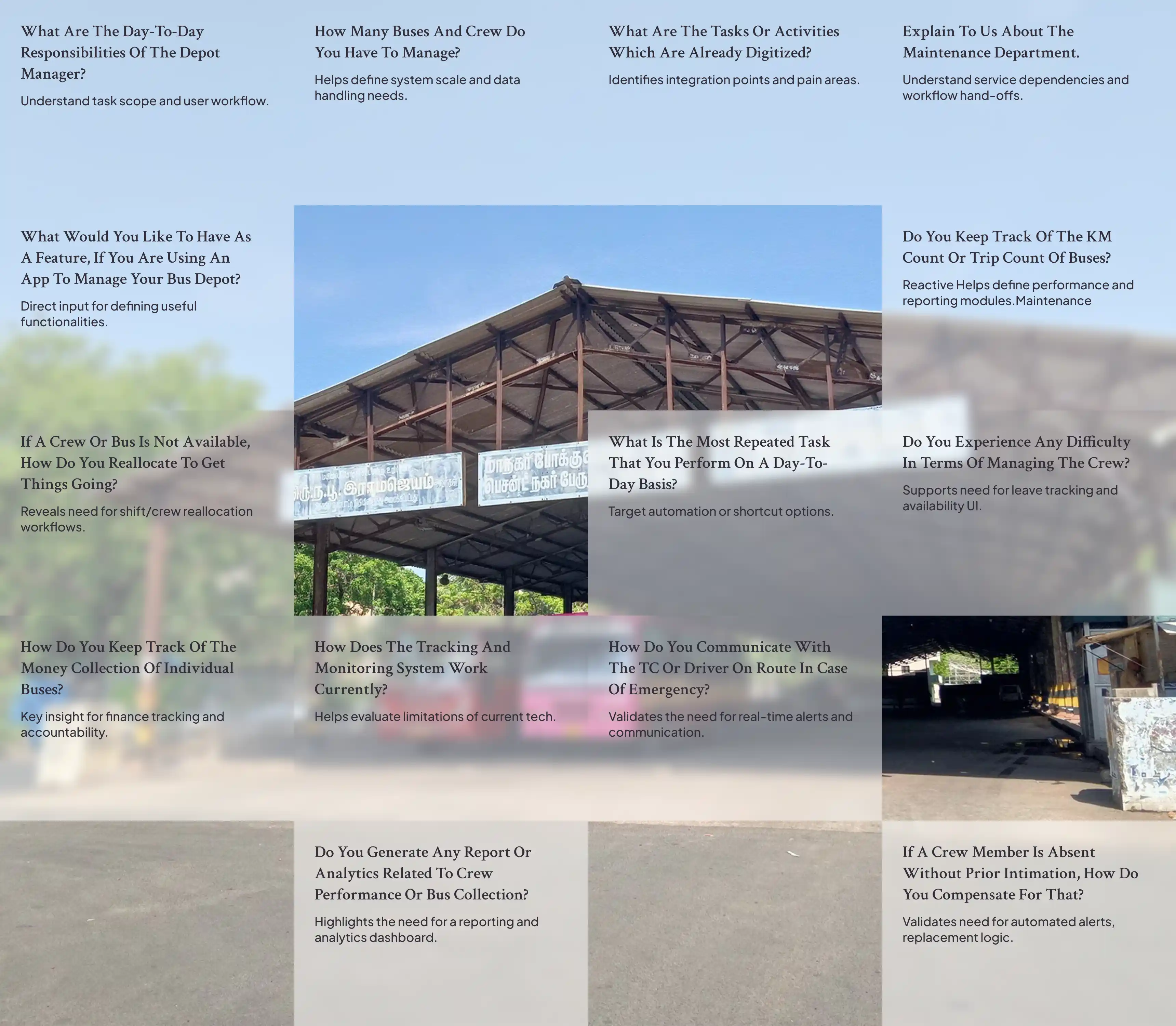
What was the problem?
In Indian government run buses, information systems consist of manual records, telephones and oral traditions. During our discussion with Senthil in the Adyar MTC depot, we did not expect such fragmentation between the various components, not due to any poor management but simply because there was no communication whatsoever between the various systems.
No real-time monitoring of the buses
Without the use of a cell phone, once Senthil has dispatched his bus, he has no means whatsoever to track its location or determine whether there has been any delay or problem associated with it until the driver calls him. The GPS is in place but distributing it to the depot is a political issue.
Communication between the crew members is through telephone calls.
People get absent from work. This absence becomes known to Senthil by telephone calls made at 5 am in the morning. He then tries to find out another member of the crew, and changes the roster. These processes are done through WhatsApp chats and writing down information on paper. The records regarding leave should be submitted before 5 pm the previous day.
Maintenance is always a reactive process
The buses go through maintenance based on monthly checks rather than need. It is only when there is a problem that the driver reports to Senthil. Senthil comes to know of the breakdown of a bus the same way as others. Buses are usually old.
Scattered communication top to bottom
Every day, Senthil gets schedule instructions from central headquarters and sends back his reports top to headquarters. There is no official communication route; everything takes place via telephone, lacking the contextual environment in every message sent. Senthil said he was "suffocating under loads of information that cannot be acted upon."
The reallocation of crews was a mess
In case the route requires change during the day, Senthil decides according to notebook where all crew data and route mentioned. There is no system that can suggest an alternative and this becomes even more difficult with intercity routes.
User Persona

Senthil Kumar
Depot Manager, MTC Adyar
Experience
12+ years managing bus fleets, scheduling and maintenance
Responsibilities
Overseeing daily depot operations, assigning buses and crew to routes, ensuring timely maintenance, coordinating with workshop teams
“I need a system that gives me a clear overview of all buses, routes and staff without wasting time flipping through papers or chasing updates.”
Challenges
Manual Coordination – Relies on phone calls and handwritten logs
No Live Visibility – Can’t track buses once they leave depot
Crew Confusion – Last-minute reassignments and absenteeism cause delays
Disconnected Data – Maintenance, fuel and collections are in silos
Needs
Real-Time Bus Tracking – Location, speed, and route updates
Crew Assignment Clarity – View who's available or on leave
Maintenance Alerts – Know which buses are due or under service
Simple Dashboards – Key numbers at a glance, accessible on desktop & tablet
Goals & Objectives
Performance Reports – Route efficiency, crew attendance, trip count
Preventive Maintenance – Predict issues before they cause delays
Crew Scheduling – Plan shifts and backups with fewer conflicts
Real-Time Alerts – Be notified of breakdowns or deviations instantly
Empathy Mapping
The design process of a public transportation management system interface demands extensive knowledge of workflow, user interaction, and industry limitations. The current project started from field research, followed by iterative wireframing and prototyping and was verified through scenario based testing with depot staff.

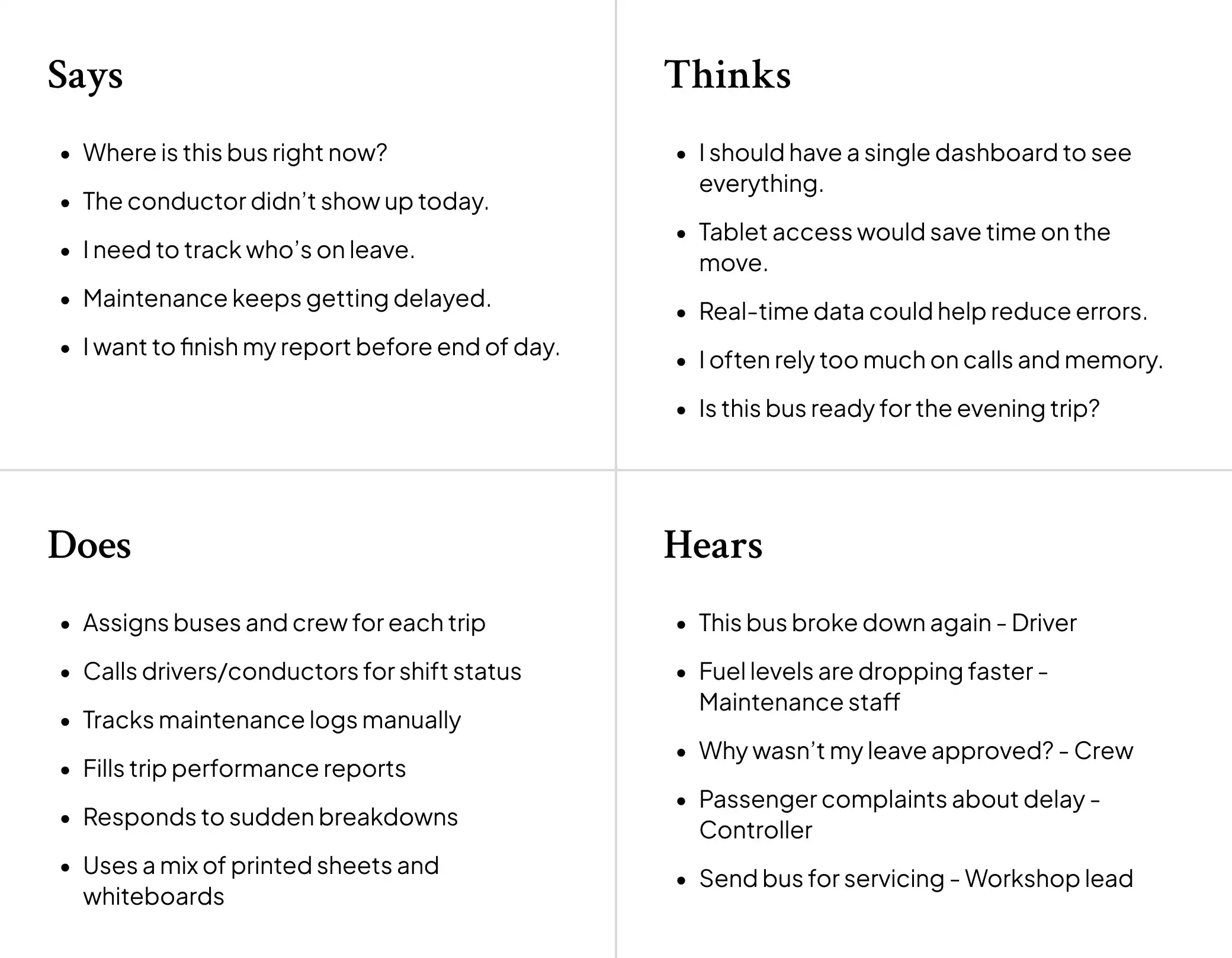
The demands have been clustered based on affinity mapping…
Design Direction
Before touching Figma, we spent time translating what we heard into three design principles. These aren't values or aspirations they're constraints that shaped every screen.
Before touching Figma, we spent time translating what we heard into three design principles. These aren't values or aspirations they're constraints that shaped every screen.
Friction-free for non-technical users
Senthil works on his desktop. There is no interest for him to know a new operating system. No training sessions. Nothing will be hidden. No menu bars. Only labels, not icons.
Scannable over comprehensive
Senthil requires responses within ten seconds rather than reports that take time to read. Each screen must respond to the most critical query at once; presenting all the information available is not the solution.
Using the technology which MTC have
Using a GPS technology in live bus tracking will be game changer as MTC bus have the GPS installed
What we decided NOT to build
We had initially proposed developing an application – but Senthil is a desktop user and using mobile design would reduce the amount of information that could be packed into the dashboard. Our second proposal was a chatbot interface for assigning new crew members to shifts we discarded this idea since it would force Senthil to enter the correct command.
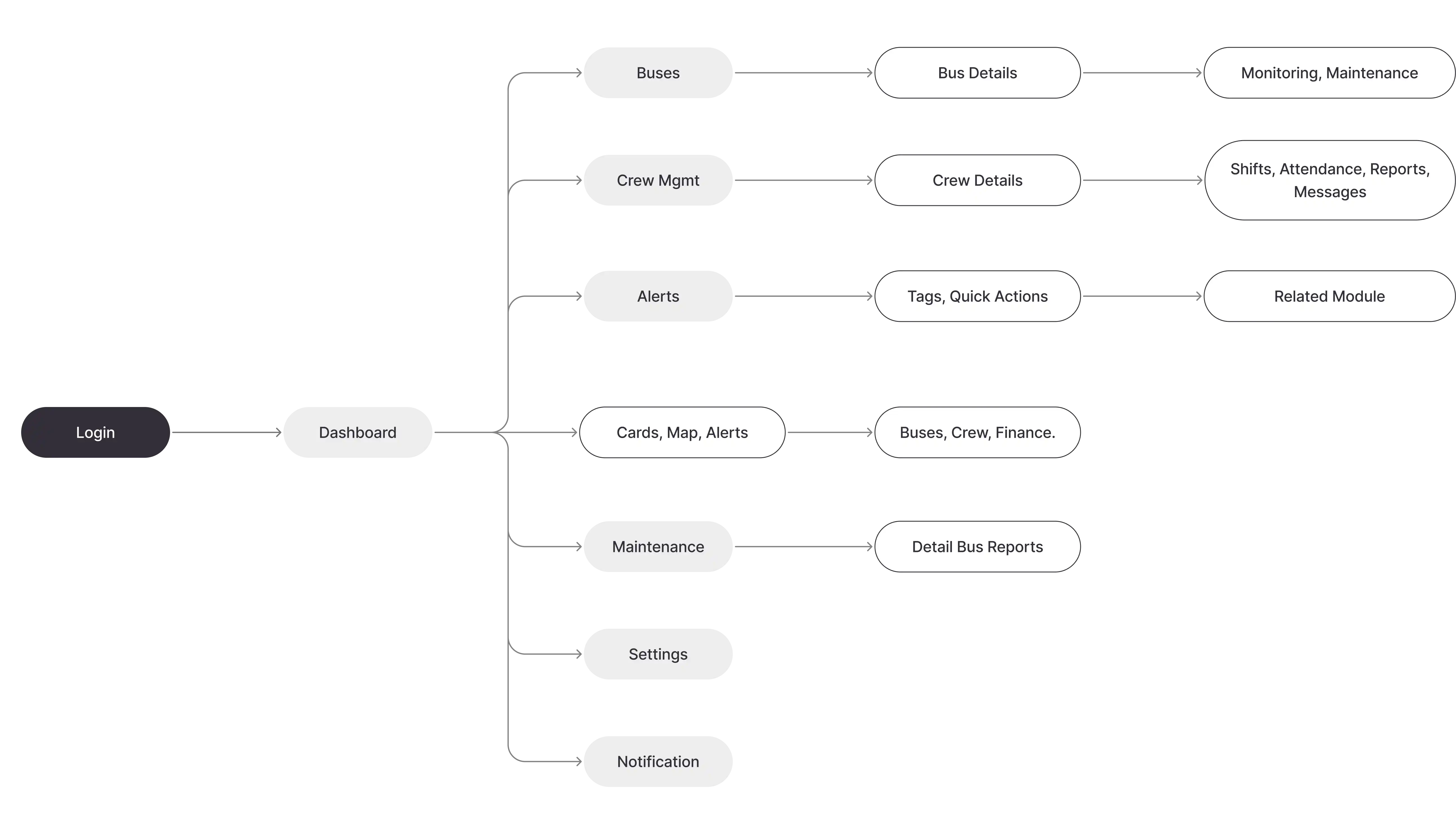
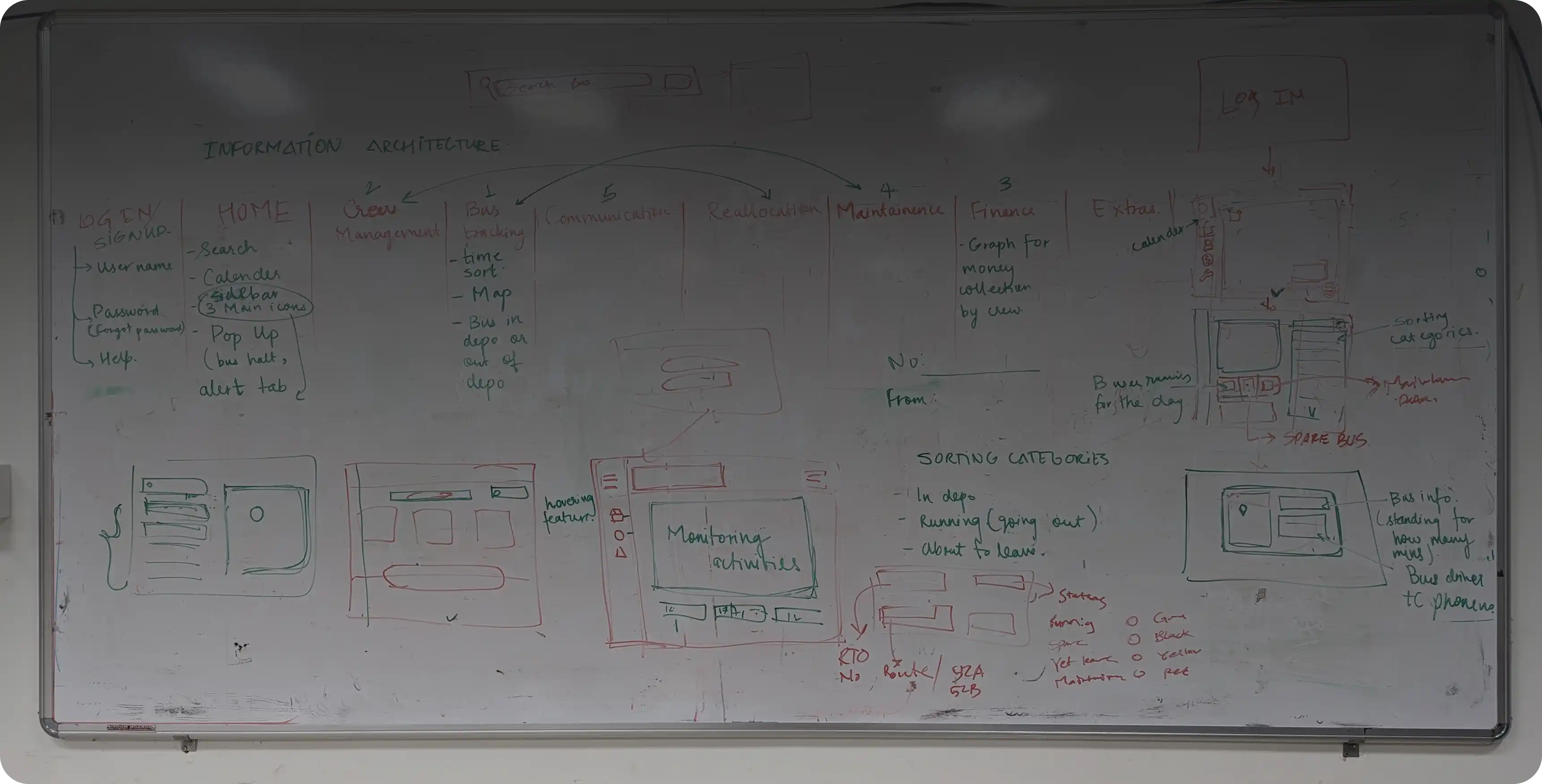
Information Architecture
Logo and Style Design
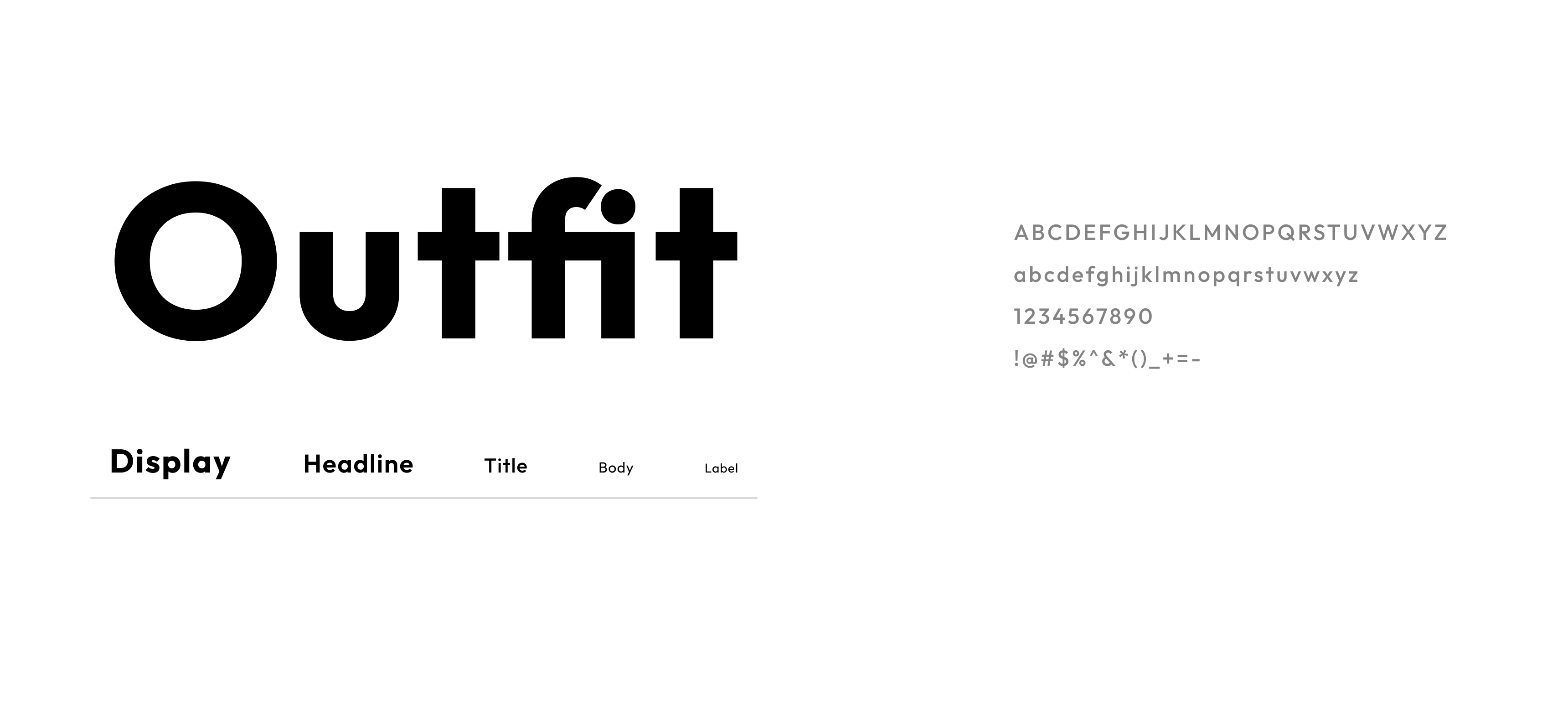
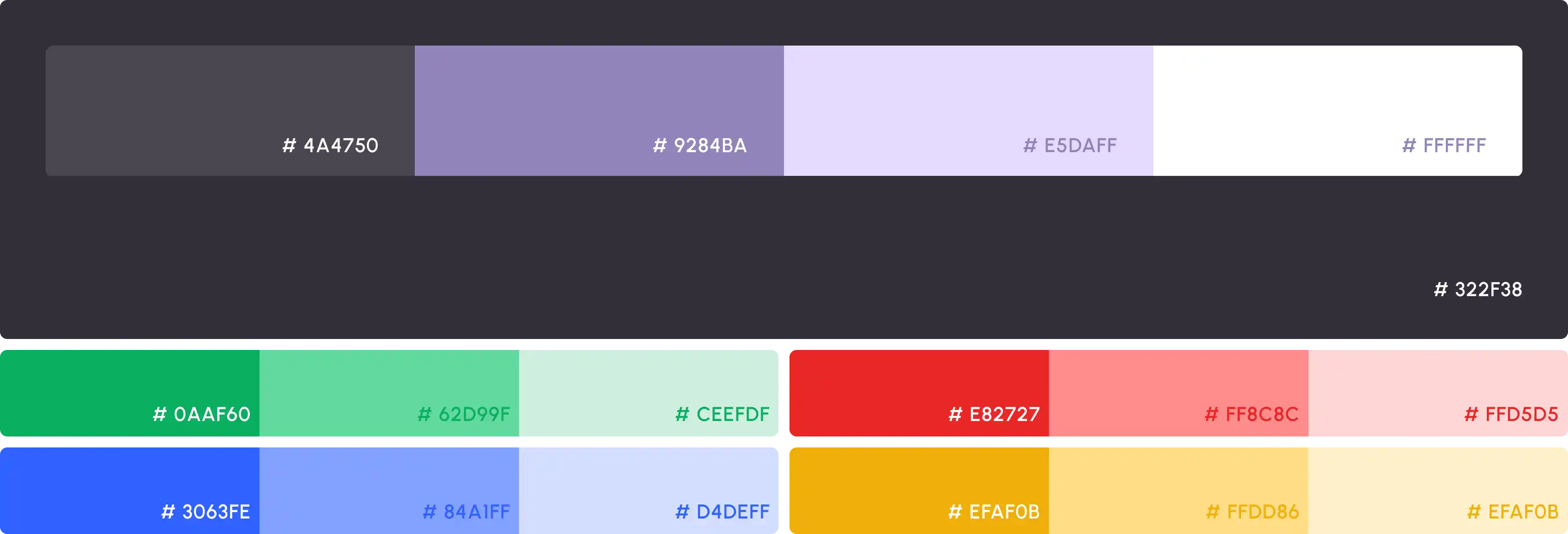
To keep consistency we designed a system
Final Designs
Dashboard
Our fleet management SaaS system's centralized dashboard for depot managers is a tool that gives a real-time and high-level overview of the fleet management process, including all buses, crews, maintenance activities, and ticketing processes. It is designed to be convenient for use from both the desktop and mobile devices.
Buses Overview
Track total buses, active fleet, and idle/standby vehicles at a glance.
Maintenance Monitoring
Stay on top of pending issues, scheduled repairs, and on-time service performance.
Crew Status
Monitor on-duty staff, manage leave requests, and identify crew gaps in real time.
Live Map Tracking
View real-time bus locations, routes, and upcoming stops to react instantly.
Finance Snapshot
Get insights into ticket sales, fare evasion, and daily revenue performance.
Bus Management
This screen displays real-time information about all buses at the depot, along with their condition, routes, fuel level, and crew. The screen is designed with depot requirements in mind, enabling swift verification of bus availability and readiness.
Fleet Snapshot
View total, active, standby, breakdown, and under-maintenance counts.
Live Grid Cards
Each bus is displayed with key status like ‘On Route’, ‘Maintenance’, or ‘Delayed’.
Route & Timing Details
Know start/end points, ETA, and next stop at a glance.
Crew Assignment
See which driver and conductor are assigned to each vehicle.
Sort, Export, Filter
Manage large fleets efficiently with quick sorting tools.
Crew Management
Crew Management screen helps the depots' managers in monitoring all their crews, including details about their positions, the routes to which they have been assigned, and their work performance.
Role-Based Listing
Separate drivers, conductors, and maintenance staff for better clarity
Status Tracking
Quickly identify crew marked as ‘On Duty’, ‘Available’, or ‘On Leave’.
Search & Sort
Easily filter by name, route, or status to reallocate crew as needed.
Assignment Mapping
Link each crew member to their currently assigned bus and route.
Weekly Shift Monitoring
See shift completions at a glance (e.g. 6/7 shifts done).
Performance Ratings
View star-based crew scores to encourage accountability.
Finance Overview
Finance screen offers the depot managers insights into the financial standing of their businesses through an overview of the revenue sources and expenses, which aids in effective financial planning. This includes day-to-day monitoring of net revenues, revenue breakdowns from tickets, fuel, maintenance, and passes.
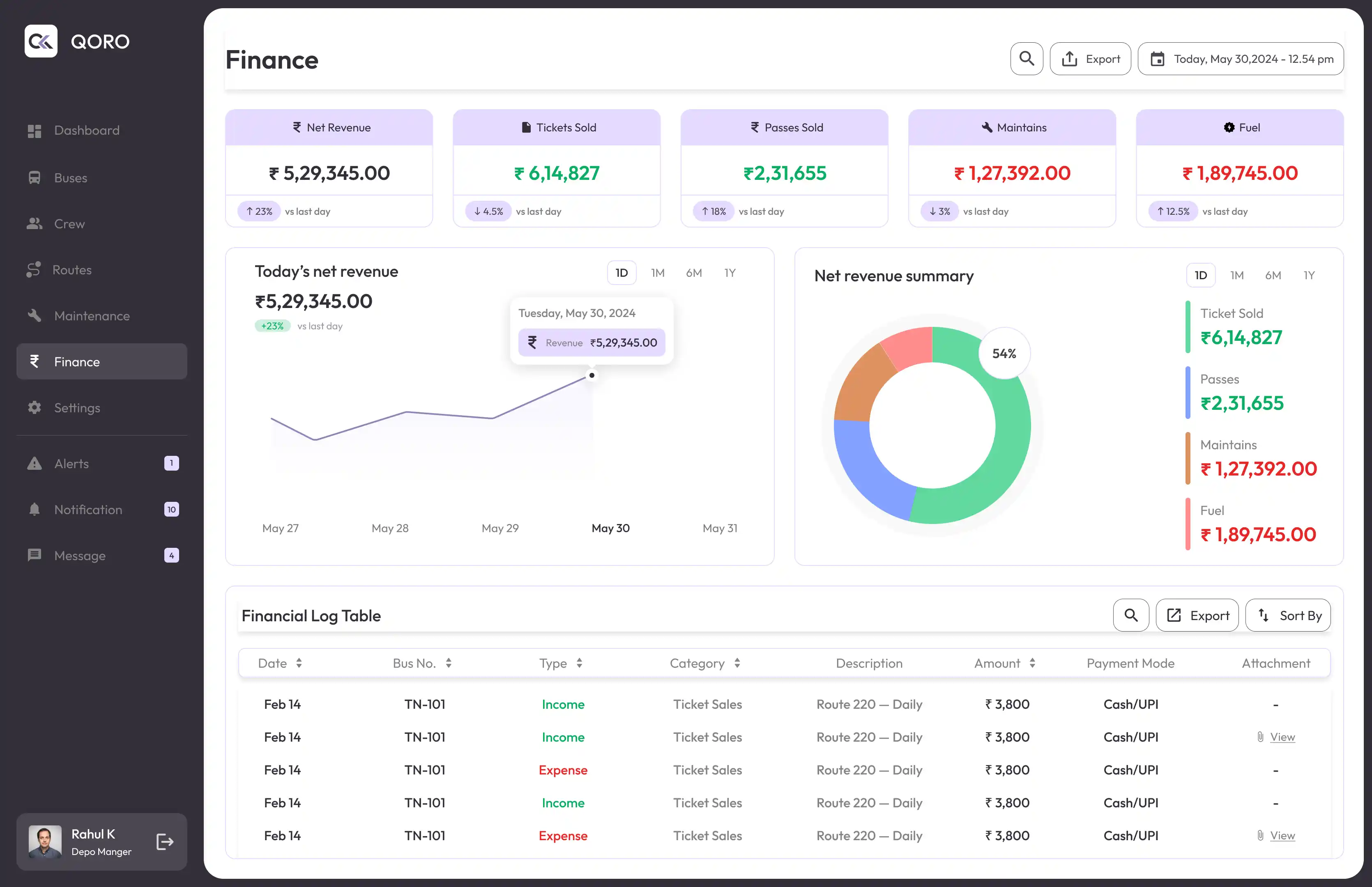
Net Revenue Analytics
Track day-wise trends with comparisons to previous days.
Revenue Breakdown
Visualize income vs. expenses by category (tickets, fuel, maintenance).
Transaction Logs
Maintain a searchable and exportable log of every financial entry.
Multi-Mode Payment Support
See cash, UPI, and digital payments clearly for transparency.
Maintenance
The Maintenance screen enables transparent service tracking and technician coordination. Every bus undergoing service is logged, categorized, and monitored for downtime, cost, and assigned personnel.
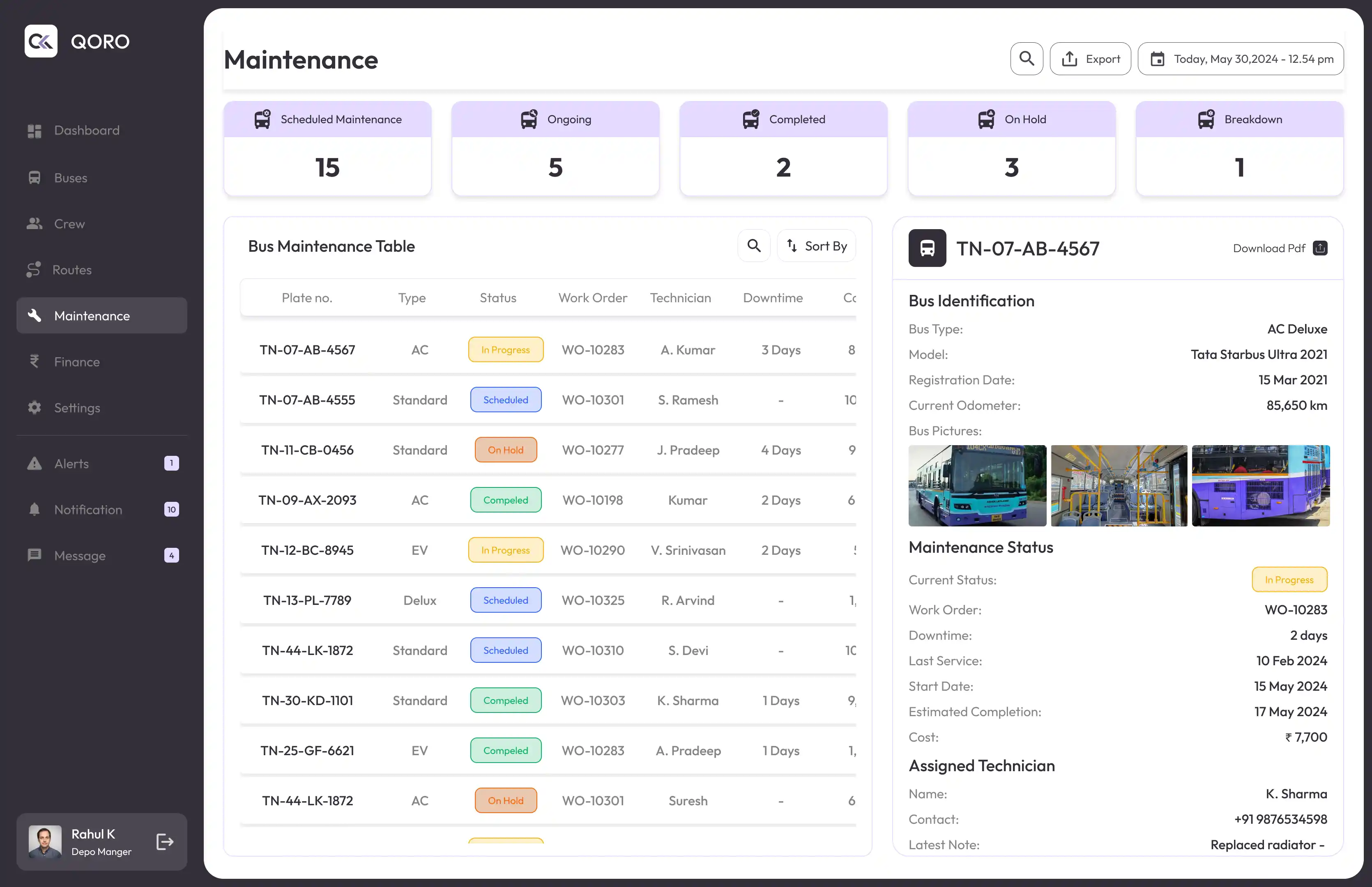
Status Breakdown
Track Scheduled, Ongoing, On Hold, Completed, and Breakdown cases.
Service Log Table
View plate number, technician, downtime, cost, and work order ID at a glance.
Technician Allocation
Each bus has a technician assigned with full contact info.
Vehicle Details Sidebar
Side panel shows model, odometer, service photos, and notes.
Alert Panel
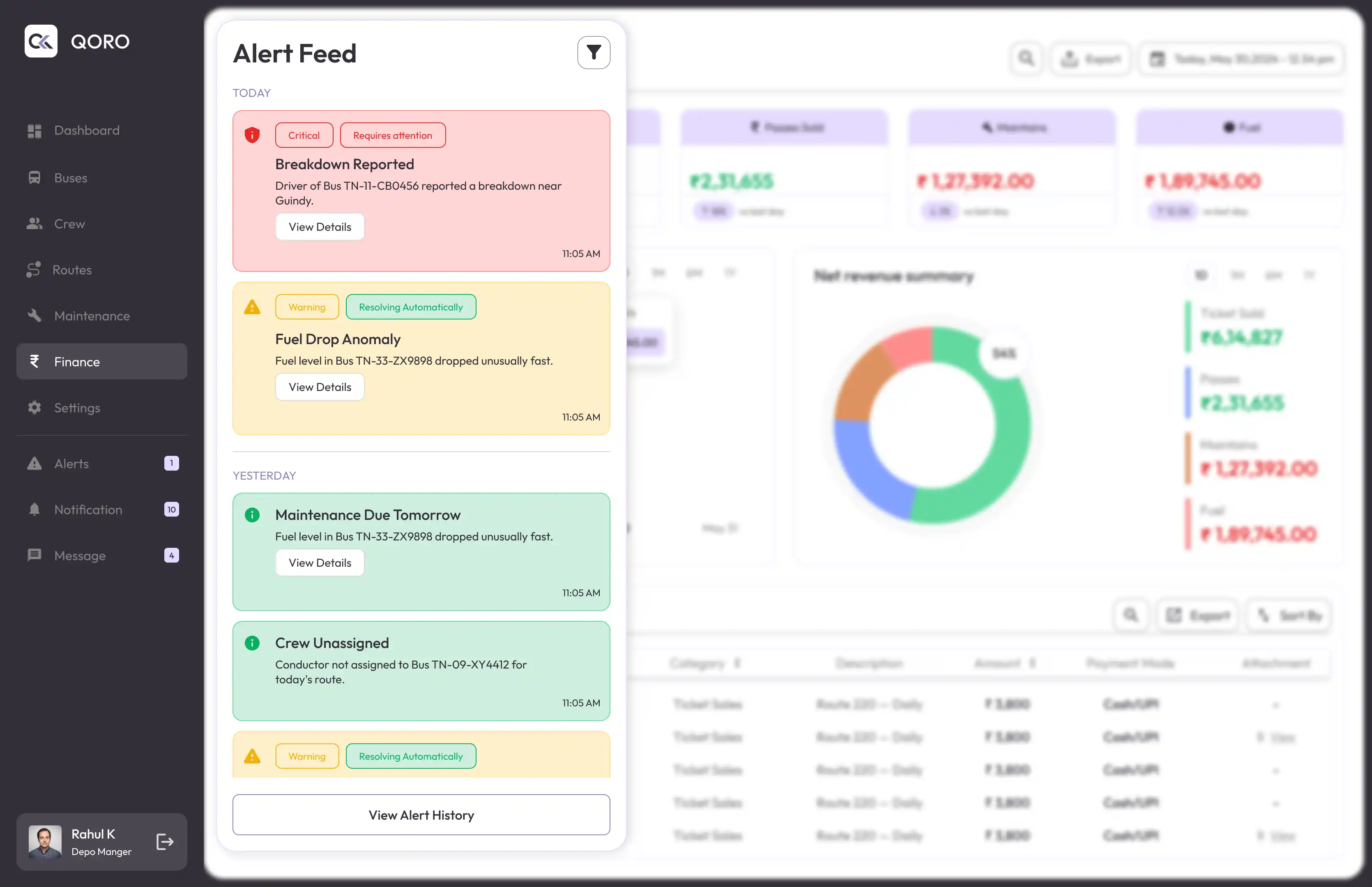
The Alert Feed panel ensures depot managers are notified of critical incidents in real-time, allowing for faster resolution and minimal disruptions. Designed as a slide-out panel, it provides timely, actionable alerts without leaving the current screen.